2. Basic Terminology and Operation
Exax is a user-space client-server application. There is one server per project using exax. A project’s source code is partitioned into two types of files:
build scripts, controlling the high level execution flow of a project, and
job scripts, intended for core computations.
A project requires at least one build script and any number of job scripts (including zero).
All code execution, be it build or job scripts, produces jobs, where a job is basically a directory on disk containing a set of files detailing all aspects of the execution of the script. A job’s files are easily accessible from other scripts using Python objects, so that they can be presented to the user or used as input to other scripts.
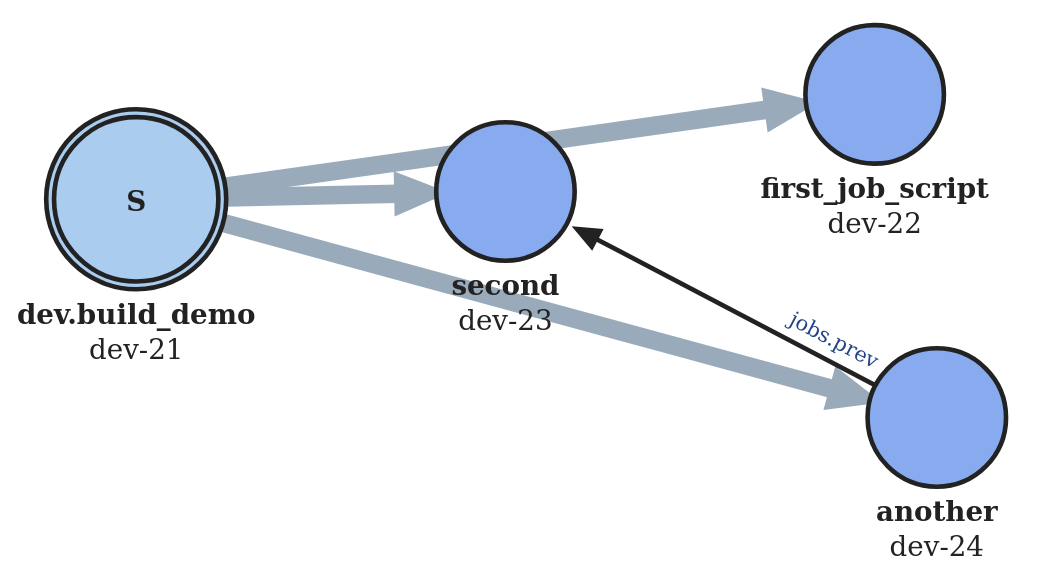
Without going into any details at this point, the figure above shows four jobs and their relations.
2.1. Block Diagram
In the block diagram below, user “interfaces” are coloured blue. The user can interact with exax using shell commands, and the board server provides access using a web browser. (There are also APIs for interfacing machines.) The figure also shows the urd transaction database that is used to store more complex sequences of execution.
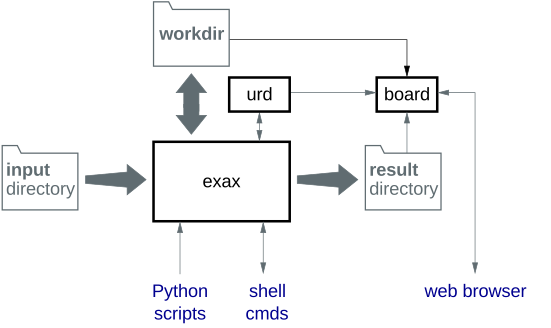
The urd transaction database will be explained later in chapter @@.
Note
While exax abstracts some interfaces using Python classes for convenience, all intermediate storage is based on files, directories, and soft links, basically making all data easy to access by a human using conventional tools. Similarly, the urd transaction database stores entries in text format.
2.2. What is a Job?
A job is a directory that was created when a build or job script was executed. The directory contains a set of files containing input parameters (including references to input data), source code, produced output files, profiling information, and anything printed to standard out and standard error during the execution.
Each job is associated with a unique identifier, such as for example
dev-37. This called the job id, and the directory (having the
job id as its name) where the information is stored is called the job
directory. Relating to the block diagram above, job directories are
stored in the workdir.
Files and data in a job are typically accessed using Python objects and convenience functions, so although the file structure is human readable, there is little reason to know about the details of it.
Jobs and job ids are almost interchangeable. A string containing a
job id (e.g. dev-37) can be converted to a Job object using
Job(dev-37). Similarly, a Job object serialises as a str.
2.3. What is a Build Script?
A build script is a Python file responsible for the top level execution flow of a whole project or a subproject. A project needs to have at least one build script, but it is common to have separate build scripts for testing and similar.
The main purpose of a build scripts is to execute job scripts and pass data and parameters between them and the build script itself. (In theory, a project may do without any job scripts at all, but then many advantages of exax will be lost.)
Execution of a build script always results in the creation of a job, so it is always possible to go back and see what scripts that have been executed in the past, as well as what input they used and what output they generated.
Note
The naming of build script files is special.
A build script has to start with the prefix build_.
For example, the build script myscript is stored in a
file named build_myscript.py.
Note
The default build script is just build.py.
All build scrips in a project can be listed using the ax script
command, or be browsed in a web browser using the built in Board web
server.
2.4. What is a Job Script?
A job script is a Python file that is executed by a build script, or in some situations by another job script. A project is typically partitioned into several job scripts controlled by a top level build script.
The first time a certain job script is executed, exax creates a job directory where it stores information throughout the script’s execution. When execution finishes, exax will return a pointer to the created job.
Conversely, if the job script has already been executed in the past, using the same inputs and parameters, exax will not create a new job directory. Instead, the execution will immediately return a pointer to this already existing job.
Note
A job script will never be executed more than once for a given set of inputs, parameters and source code. Existing results will be re-used and not re-computed.
Job scripts can do simple, but very powerful, parallel processing. Execution flow in a job script is controlled by a few pre-defined functions.
Tip
A machine equipped with 64 core can do one CPU-core-hour of work in less than one minute, if workload is parallellised. A more common of the shelf inexpensive eight-core CPU can do one CPU hour of work in just 7.5 minutes!
All job scripts in a project can be listed using the ax method
command, or be browsed in a web browser using the built in Board web
server.
2.5. An Example
Here is the image from the top of this document again. To the left, it shows a job that was build by a build script. The build script also built three jobs from job scripts, represented by the three jobs to the right. The wide arrows point out of the build job to show the jobs it created. The thin arrow from “another” to “second” shows that “another” is using some data created by “second”.
2.6. A Few More…
What is a workdir?
Job directories are stored in workdirs, which are just ordinary directories. For most project, one workdir is enough, but for example in a collaborative environment it makes sense to have unique workdirs for each user. The name and location of the workdirs are defined in the configuration file.
What is a method package
This is where build and job scripts are stored. As the name indicated, they are importable Python packages.
The standard job scripts bundled with exax are stored in another package, and example files in yet another. It is possible to define any number of packages in the configuration file.
What is the result directory
This is where important results may be stored. Defined in the configuration file
What is the input directory
This is a path to where the input data files are stored. Defining this in one place makes the path to the data relative, meaning that data can be moved around in the file system without causing changes to any job. Defined in the configuration file