3. High Level Example Project
This section provides a high level example to get an idea on how to use exax in a project, and how to partition the code into build and job scripts.
3.1. Example
Assume a project dealing with training some machine learning model on a given dataset. The input data is stored in a format that needs some parsing, and some cleanup of the data is necessary as well.
Here is an idea of what the build script may look like.
 def main(urd):
     pdata = urd.build('parse', filename='input_filename')
     clean = urd.build('clean', data=pdata)
     train = urd.build('train', data=clean)
     plot1 = urd.build('plot_train', input=train)
     plot2 = urd.build('plot_data', input=clean)
     plot1.link_result('graph.png')
     print(plot1.filename('graph.png')
Each urd.build function calls a job script with a parameter list.
For example, the third line will call the clean job script, and
set its input parameter data to the value pdata, which is the
resulting job object output from the parse job script call on the
line above. And so on.
The second to last line makes the graph.png file from the
plot_data script directly visible in the board web server (and
also in the results/-directory in the project installation
directory.
The last line will print the full path to graph.png, just to
illustrate that exax is working with plain files, and they are always
easy to find.
The graph below illustrates the created jobs and their dependencies.
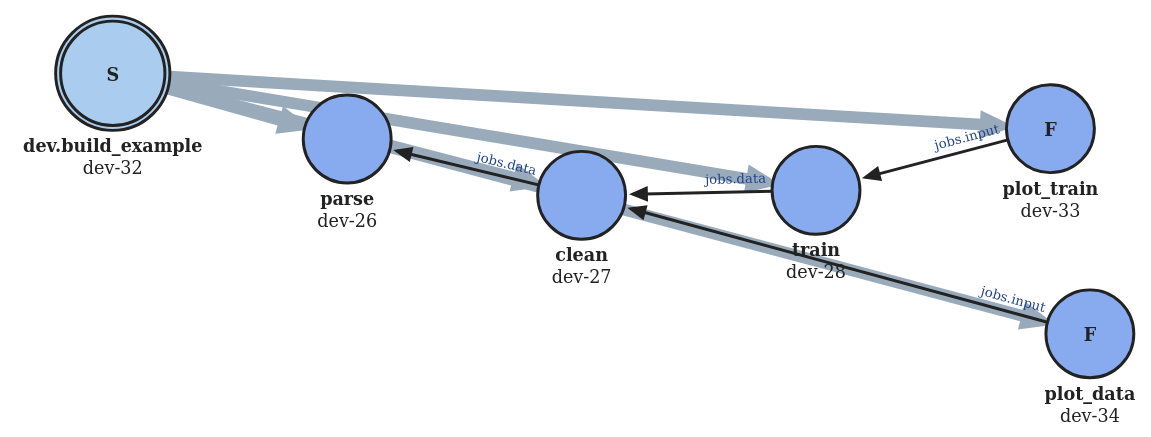
The “F” mark on the plot jobs indicate that they contain created files. The “S” mark on the build script indicates that it has created other jobs. Note that the thin arrows depicting dependencies between jobs have a text attached with the corresponding parameter it is passing.